Running Meetings
Overview
Use the meeting page to run live sessions, manage voting by category, and collect speaker feedback.
This guide focuses on officer controls available during an active meeting.
Before the Meeting (Quick Checks)
- Open the meeting and confirm the status is Scheduled.
- Verify prepared speakers and evaluators are assigned in the agenda so voting and feedback lists are easier to populate.
- Confirm officers know who will manage voting and who will manage feedback.
- Keep the meeting page open on a stable connection before the meeting starts.
Review RSVP Responses Before Start
Use the RSVP banner in scheduled meetings to review who is planning to attend:
- Expand the responses list in the RSVP banner.
- Check the RSVP breakdown and names.
- Use this to plan manual attendance follow-up during the meeting.
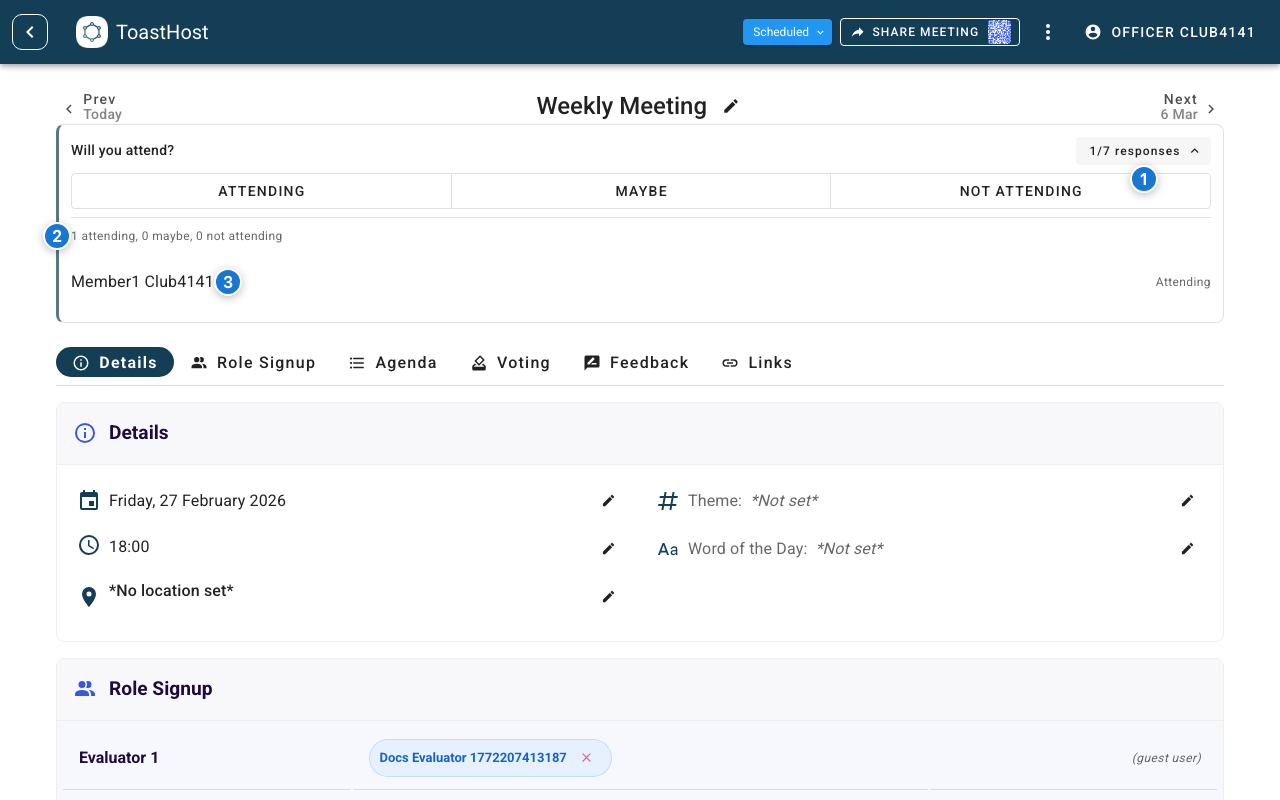
Callouts in the screenshot:
- Toggle to expand/collapse the RSVP response list.
- RSVP breakdown summary.
- Per-member RSVP list.
During the Meeting
Start the Meeting
- Open the meeting page as an officer.
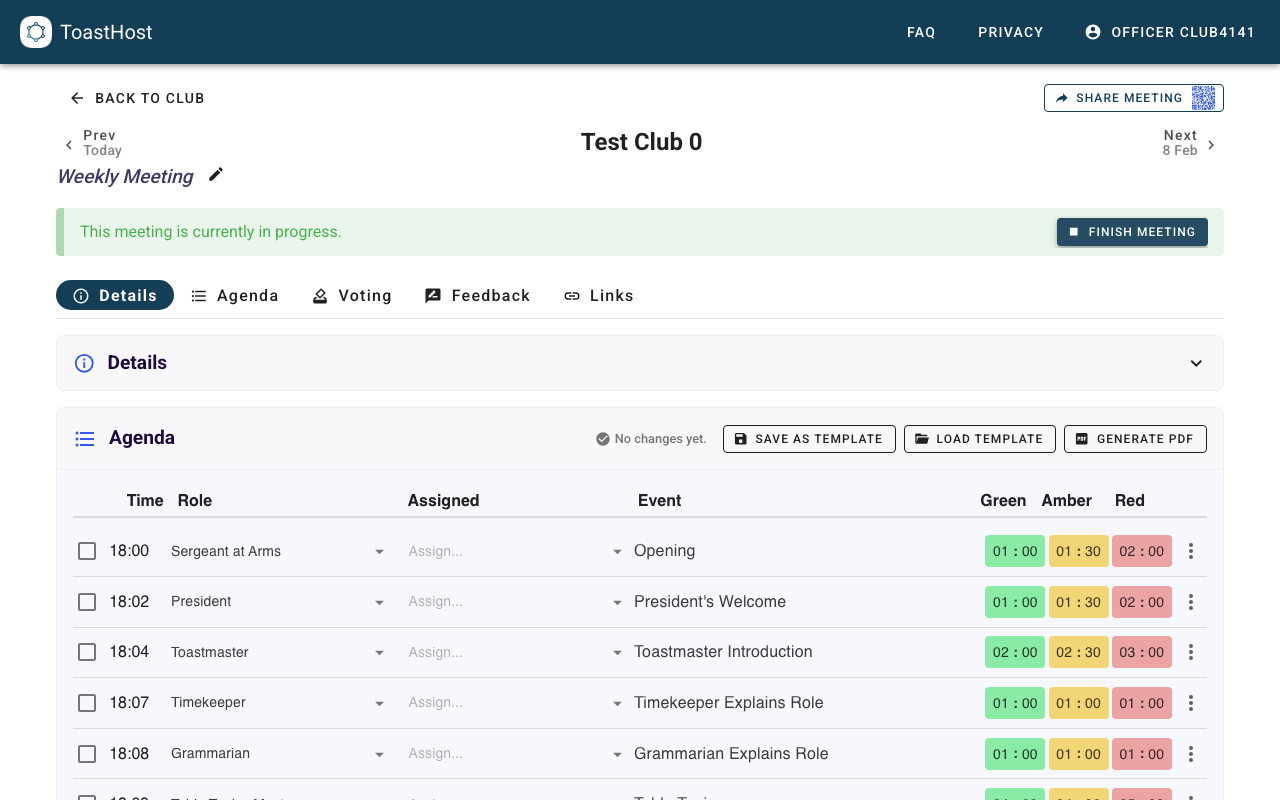
- In the status banner, click Start Meeting.
- Confirm the status changes to In Progress.
Manage Agenda Flow During the Session
Use the Agenda section to track speaker order and progress through the meeting.
If roles or sequencing change mid-meeting, update agenda assignments so voting and feedback controls stay aligned with what happened live.
Track Attendance in Real Time
During In Progress meetings, officers can use the attendance manager in the Details section:
- Use the summary chip to monitor
X attended / Y members. - Search for a member and mark Yes or No manually when needed.
- Keep Include expired members off by default, and enable it only when you need to include expired roster members in the view.
As members vote or submit feedback while authenticated, attendance can auto-update in real time and the summary refreshes.
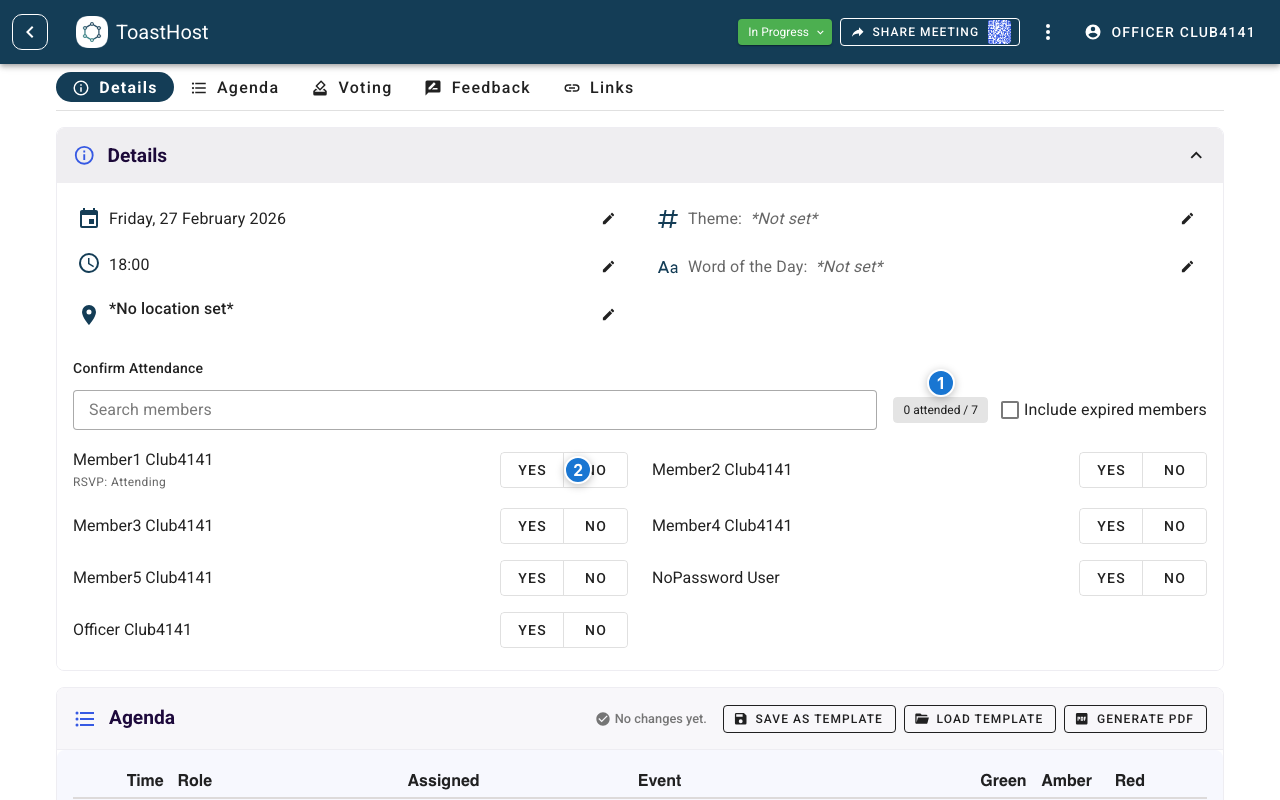
Callouts in the screenshot:
- Attendance summary chip (
X attended / Y members). - Row-level attendance controls (Yes/No) for officer overrides.
Manage Voting
Each voting category has its own panel, status indicator, and open/close switch:
- Best Speaker
- Best Evaluator
- Best Table Topics
Open or Close Voting by Category
- Go to the Voting section.
- Use each category switch to set that category to Open or Closed.
- Keep categories open while expected voters are submitting votes.
- Close categories when your club is ready to finalize each award.
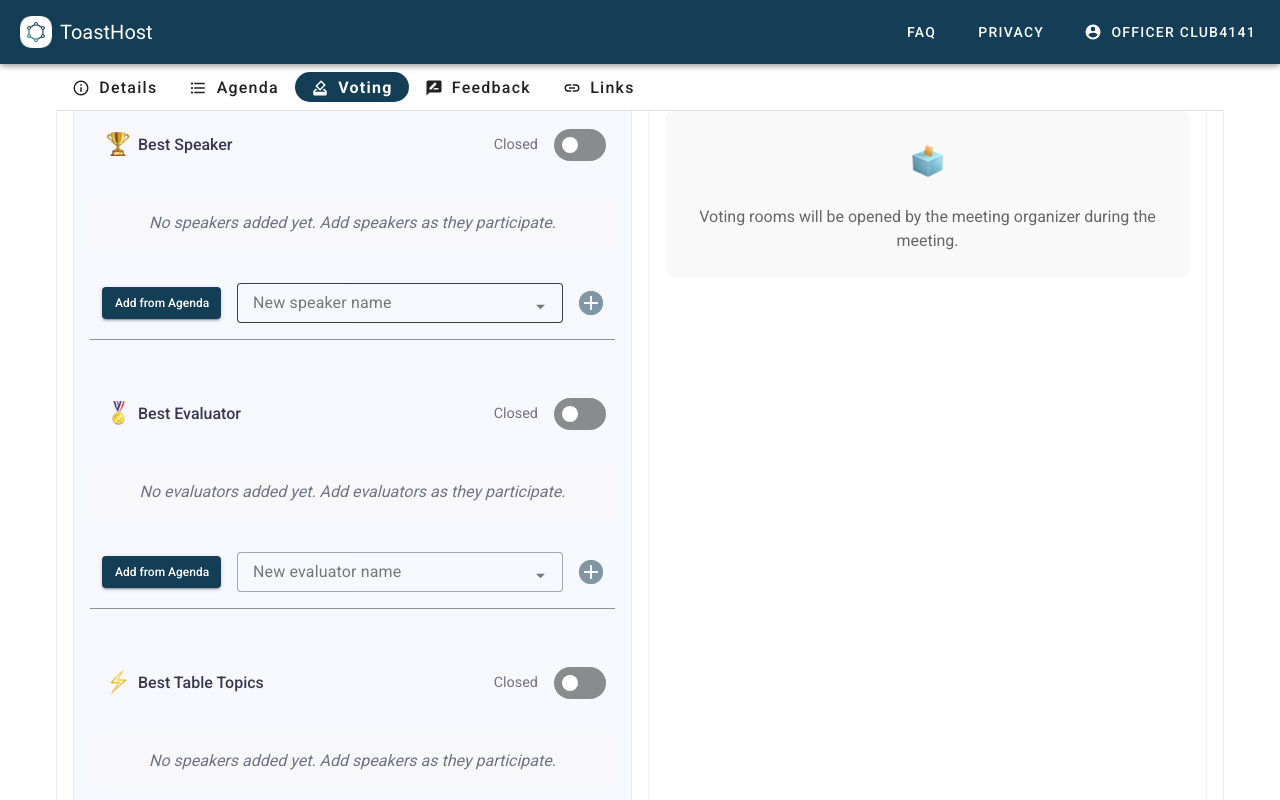
The Add from Agenda button adds missing agenda-linked candidates to the current voting category. The Sync with Agenda button compares the agenda with the current voting candidates and lets officers review additions or removals before applying them.
Automatic Add from Agenda Enabled
If your club has enabled Automatically add agenda participants to voting in Club Settings, ToastHost adds eligible agenda participants to voting automatically after agenda changes are saved.
In this mode:
- Automatic behavior is add-only. New eligible agenda participants are added automatically, but removals are never applied automatically.
- The flow is one-way. Editing voting candidates never changes the agenda.
- The Sync with Agenda button appears when the voting candidates and agenda no longer match, so officers can review additions or removals before applying them.
- If a voting category has removals pending, close that category before applying the sync.
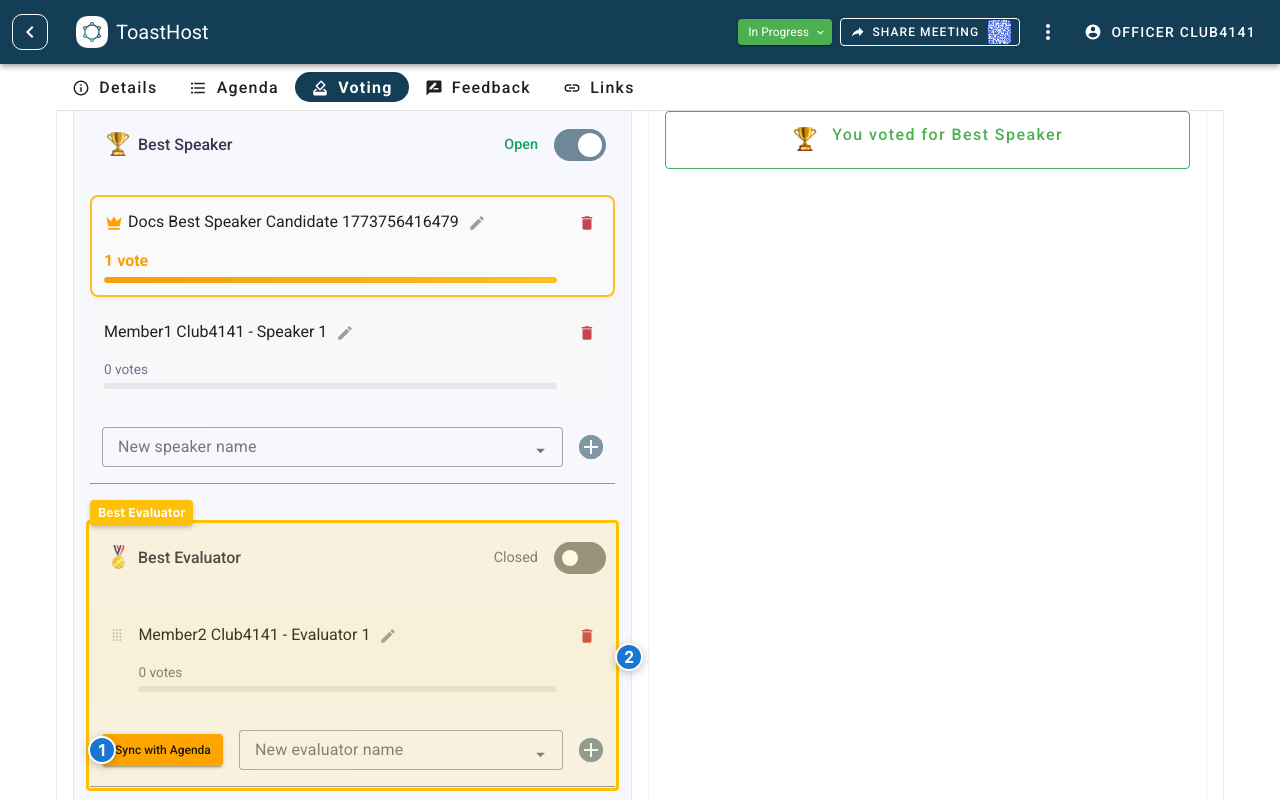
Callouts in the screenshot:
- The Sync with Agenda button appears when the candidate list and agenda no longer match and need officer review.
- The existing agenda-linked candidate stays in the panel until the reviewed sync is applied.
Manual Use of the Add from Agenda Button
If automatic voting add is off, the Add from Agenda button is shown when ToastHost detects eligible agenda participants who are not already in the candidate list.
Use it to pull in agenda-linked candidates without typing them manually. This is still one-way: adding, removing, or renaming candidates in voting does not change the agenda.
If the current candidate list only needs missing agenda-linked names added, ToastHost shows the Add from Agenda button. If the current candidate list needs review because agenda-linked candidates should be removed or there is a mixed mismatch, ToastHost shows the Sync with Agenda button instead.
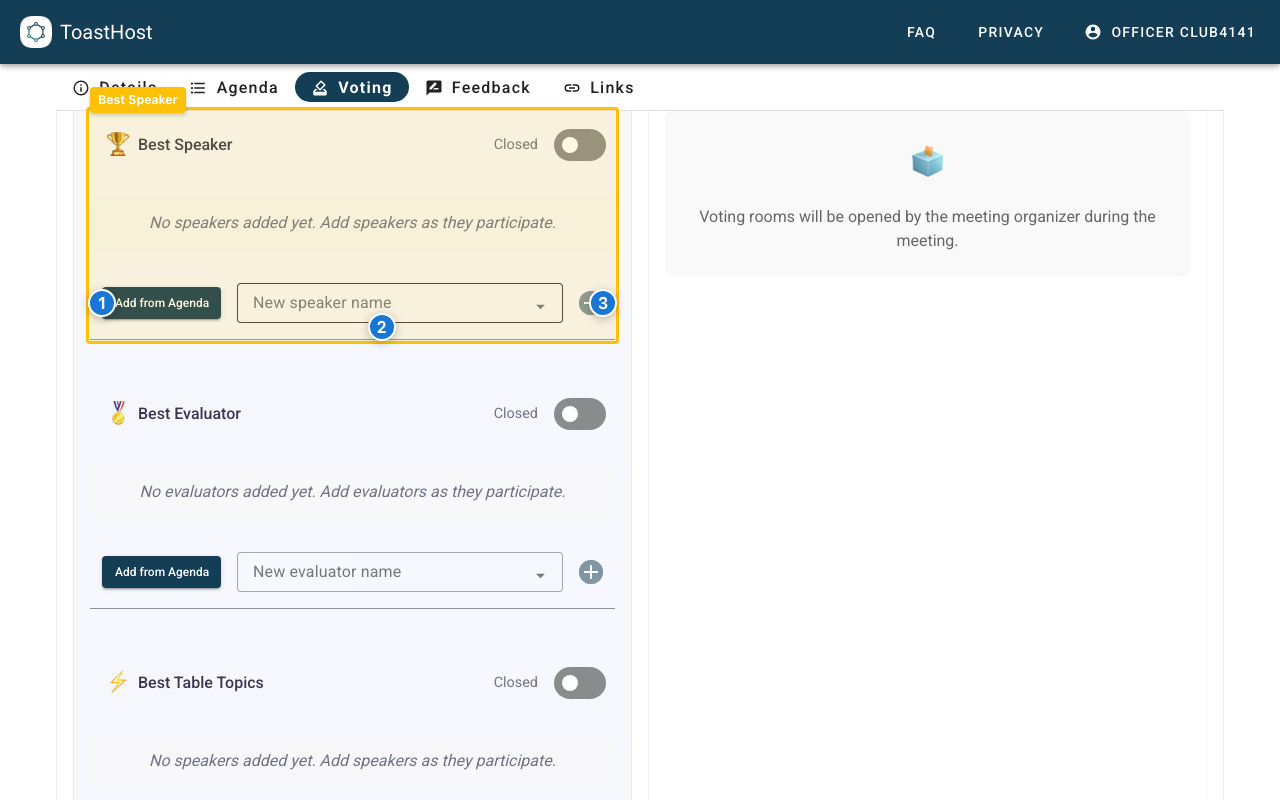
Callouts in the screenshot:
- The Add from Agenda button syncs eligible speaker candidates from the agenda.
- Use the candidate input to add a name manually.
- Click the add button to create the manual candidate.
Best Table Topics: Handling Ad-Hoc Speakers
Table Topics speakers are often decided live during the meeting. Guests may participate, and names come up on the spot. Because of this, manual candidate entry is the most common way to populate Best Table Topics.
Use the candidate input to add each speaker as they finish their Table Topics response.
If your club plans Table Topics speakers on the agenda ahead of time, the same Add from Agenda and Sync with Agenda buttons from the other voting categories work here too.
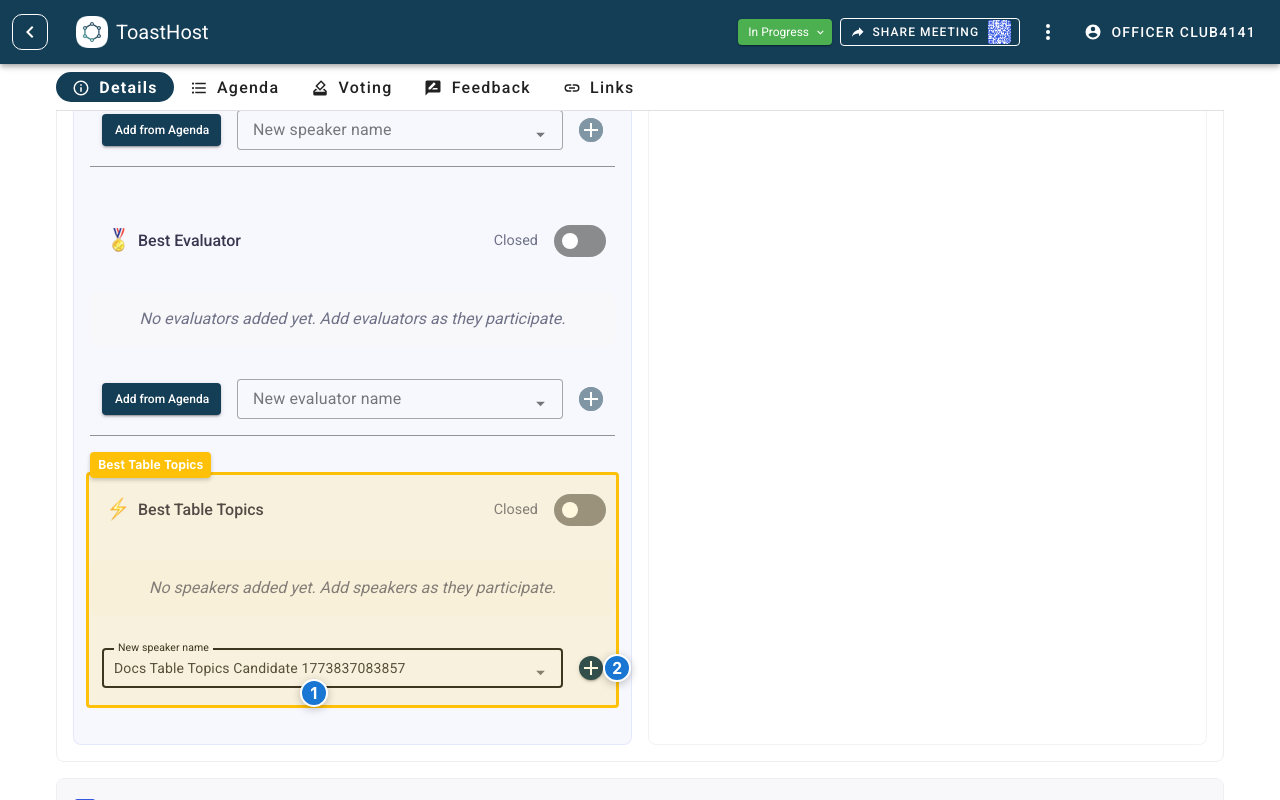
Callouts in the screenshot:
- Enter the Table Topics speaker name in the candidate input.
- Click the add button to add that candidate to Best Table Topics.
Add candidates as they speak
For live Table Topics, add each speaker to the candidate list right after they finish. This keeps the list current and avoids a scramble at voting time. If your Table Topics speakers are already on the agenda, use the Add from Agenda button or Sync with Agenda button just as you would for Best Speaker or Best Evaluator. If automatic voting add is on, ToastHost adds eligible agenda-linked Table Topics speakers automatically.
Customizing Which Roles Qualify for Best Evaluator
By default, the Evaluator and Table Topics Evaluator agenda roles are eligible for Best Evaluator voting. When you use Add from Agenda (or automatic add is enabled), only agenda participants assigned to one of these roles appear as Best Evaluator candidates.
If your club uses additional roles that should count as evaluators — for example, Grammarian — you can adjust this in Club Settings → Meeting & Voting Configuration using the Evaluator voting roles setting.
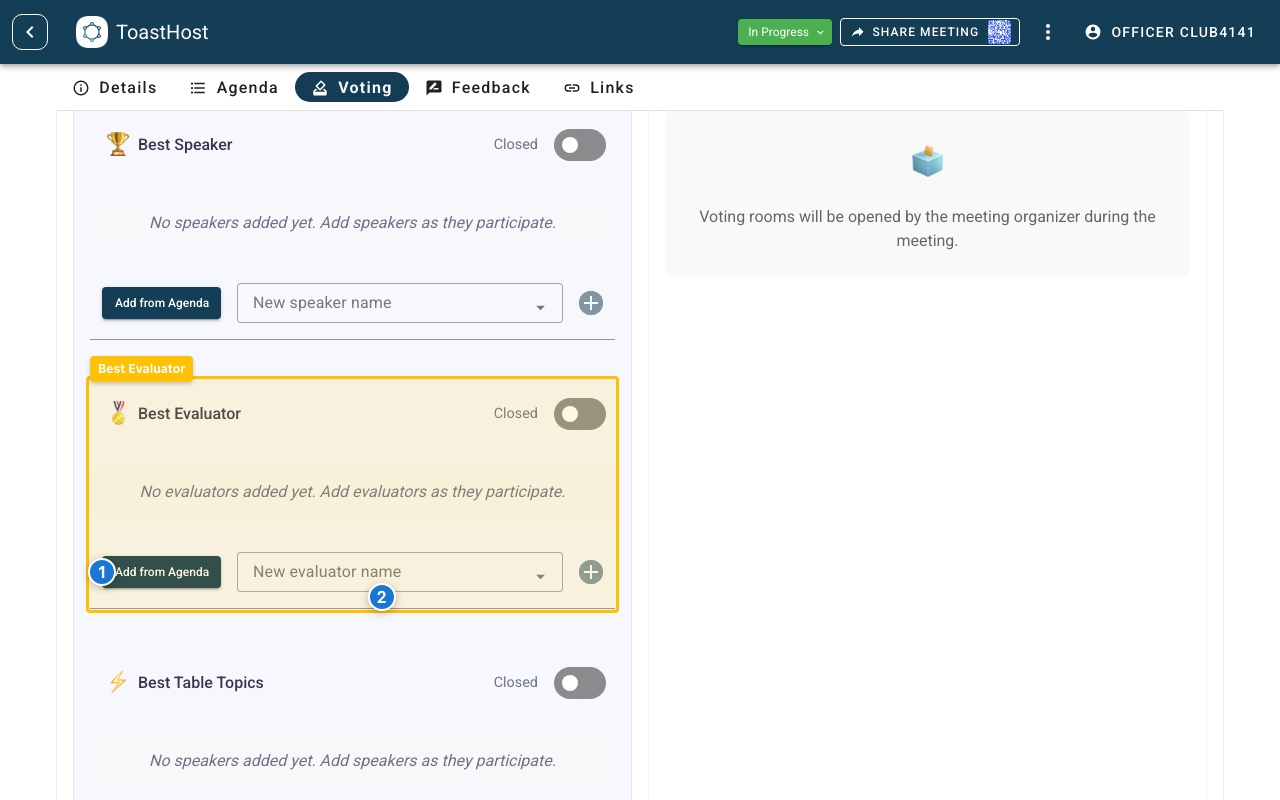
Callouts in the screenshot:
- The Add from Agenda button adds eligible evaluator candidates from the agenda.
- Use the candidate input to add an evaluator manually if they are not on the agenda.
One Vote Per Person (Including Officers)
Each user can vote once per category. This includes members, guests, and officers.
After you open a category and add candidates, the public voting control shows Vote for ...:
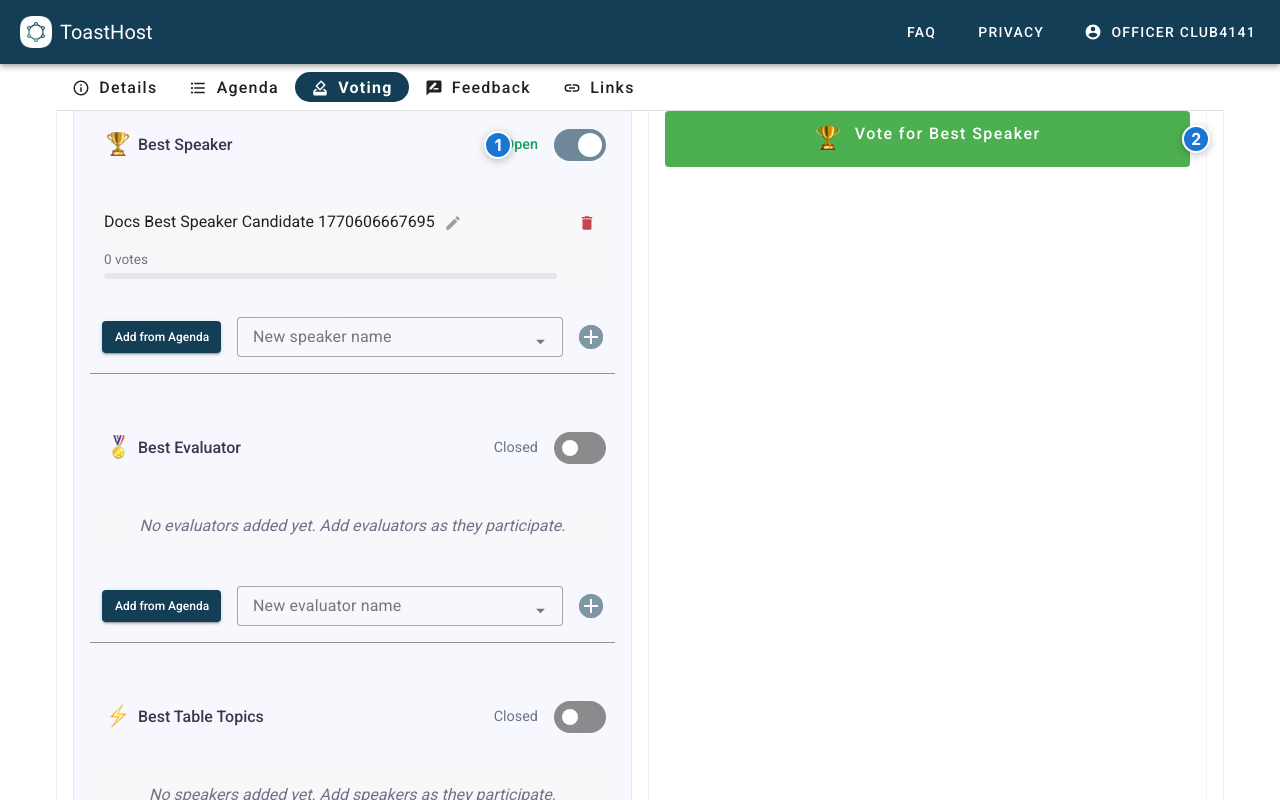
Callouts in the screenshot:
- The category is Open in the officer voting panel.
- The public voting pane shows Vote for Best Speaker before submission.
After the vote is submitted, the same button changes to You voted for ...:
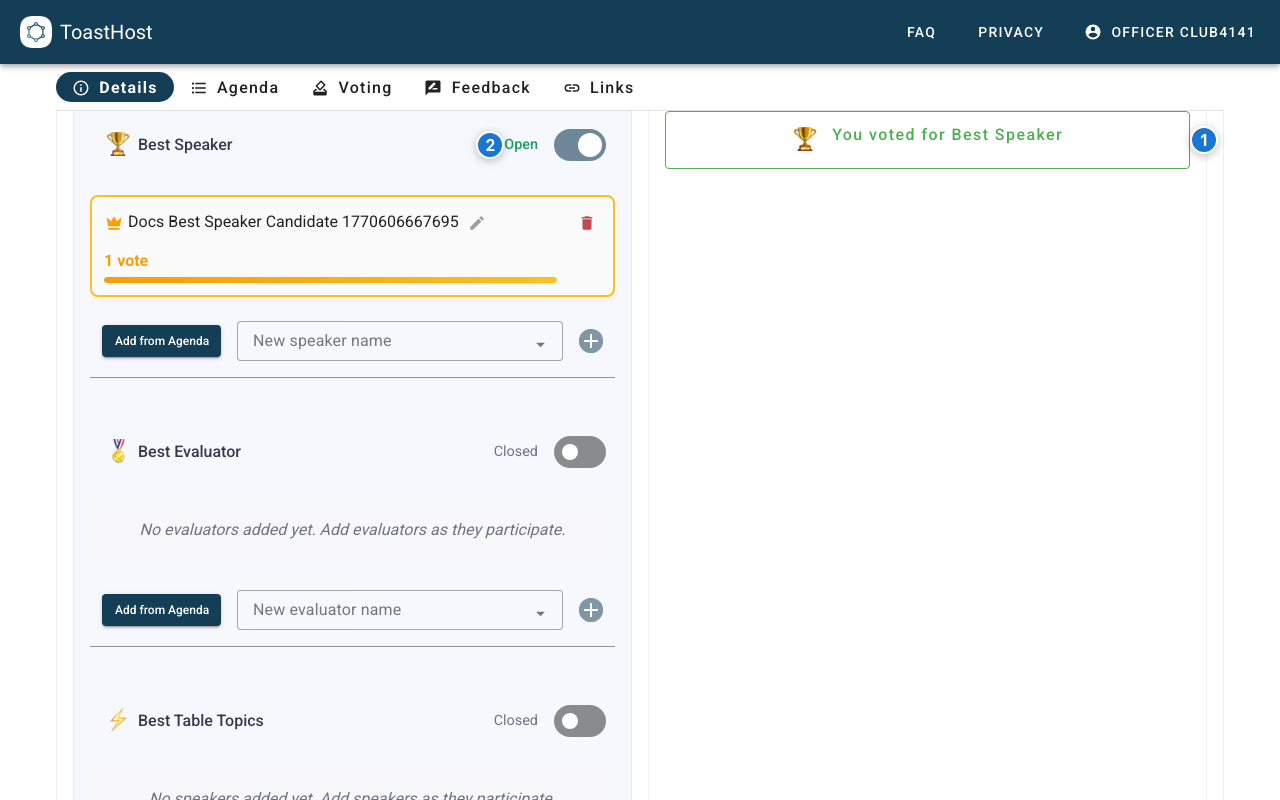
Callouts in the screenshot:
- The button now shows You voted for Best Speaker.
- The category can remain Open so other members can still vote.
If this same user selects the button again, ToastHost opens a read-only confirmation state instead of allowing a second vote submission.
Officers can use this same public pane to cast their own vote.
Collect Feedback
Use the Feedback section to manage speaker feedback subjects.
- Set the feedback session to Open when members should start submitting.
- If automatic feedback add is on, confirm agenda speakers appear after agenda changes are saved.
- Add subjects manually for speakers who are not in the current agenda list.
- Use the Sync with Agenda button when you need to review agenda-linked additions or removals.
- Set feedback to Closed when submissions should end.
When you finish the meeting for the first time, ToastHost automatically emails the collected feedback to eligible speakers. Officers do not need to send the standard feedback bundle manually afterward.
The Add from Agenda button adds missing agenda-linked speakers to feedback. The Sync with Agenda button compares the agenda with the current feedback subjects and lets officers review additions or removals before applying them.
Automatic Add from Agenda Enabled
If your club has enabled Automatically add agenda speakers to feedback in Club Settings, ToastHost adds agenda speakers to feedback automatically after agenda changes are saved.
In this mode:
- Automatic behavior is add-only. New agenda speakers are added automatically, but removals are never applied automatically.
- The flow is one-way. Editing feedback subjects never changes the agenda.
- The Sync with Agenda button appears when the feedback subjects and agenda no longer match, so officers can review additions or removals before applying them.
- Removing an agenda-linked subject through the Sync with Agenda button also removes any feedback already submitted for that subject.
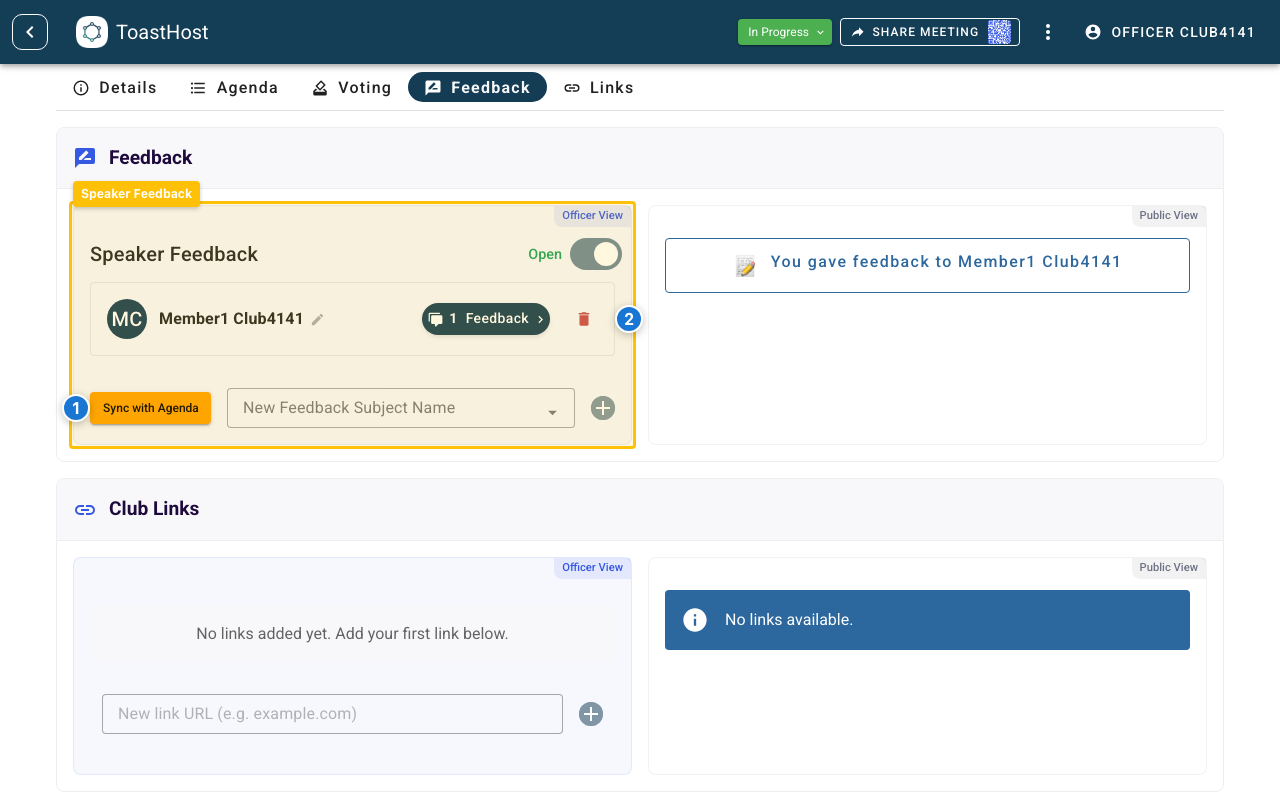
Callouts in the screenshot:
- The Sync with Agenda button appears when the feedback subjects and agenda no longer match.
- The agenda-linked speaker stays in the subject list until the reviewed sync is applied.
Manual Use of the Add from Agenda Button
If automatic feedback add is off, use the Add from Agenda button to pull assigned Speaker entries into feedback subjects when needed.
This is still one-way: adding, removing, or renaming feedback subjects does not change the agenda.
If the current subject list only needs missing agenda-linked speakers added, ToastHost shows the Add from Agenda button. If the current subject list needs review because agenda-linked subjects should be removed or there is a mixed mismatch, ToastHost shows the Sync with Agenda button instead.
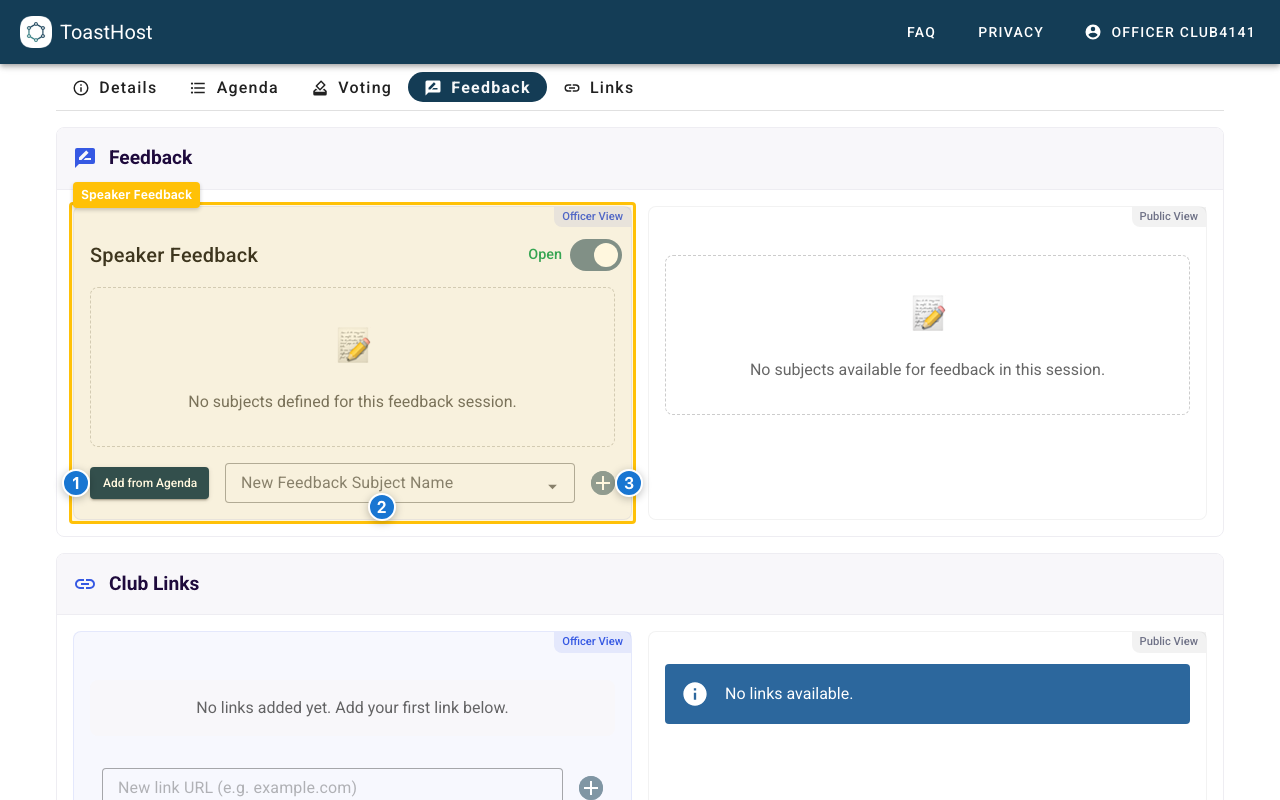
Callouts in the screenshot:
- The Add from Agenda button adds eligible Speaker agenda entries as feedback subjects.
- Use the subject input to add a feedback subject manually.
- Click the add button to create the manual feedback subject.
Feedback Before and After Submission (Public View)
When the feedback session is Open and at least one subject exists, the public feedback pane shows Give feedback to ...:
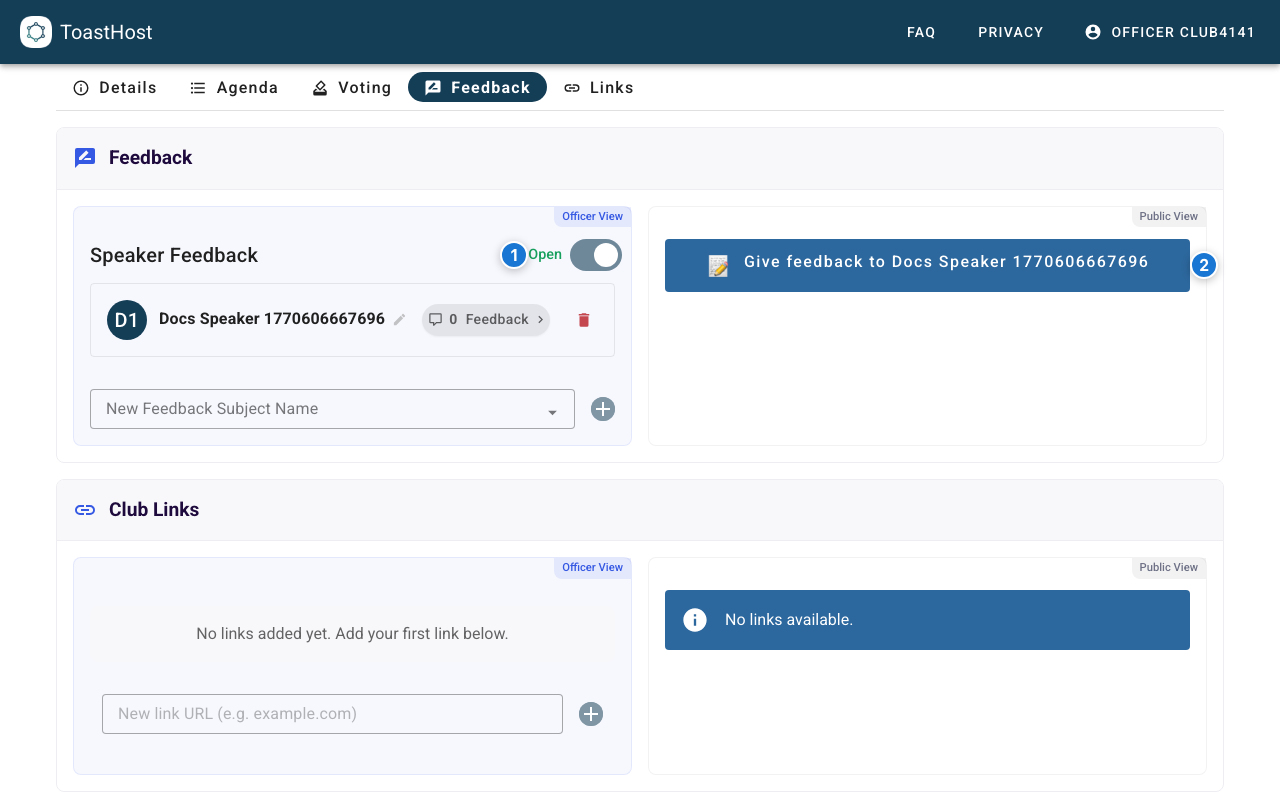
Callouts in the screenshot:
- The feedback session is Open in the officer feedback panel.
- The public pane shows Give feedback to ... before any feedback is submitted.
After a user submits feedback for a speaker, the button changes to You gave feedback to .... This indicates the user has submitted at least one feedback item, but it does not prevent additional feedback submissions. Users can submit feedback multiple times for the same speaker while the session is open.
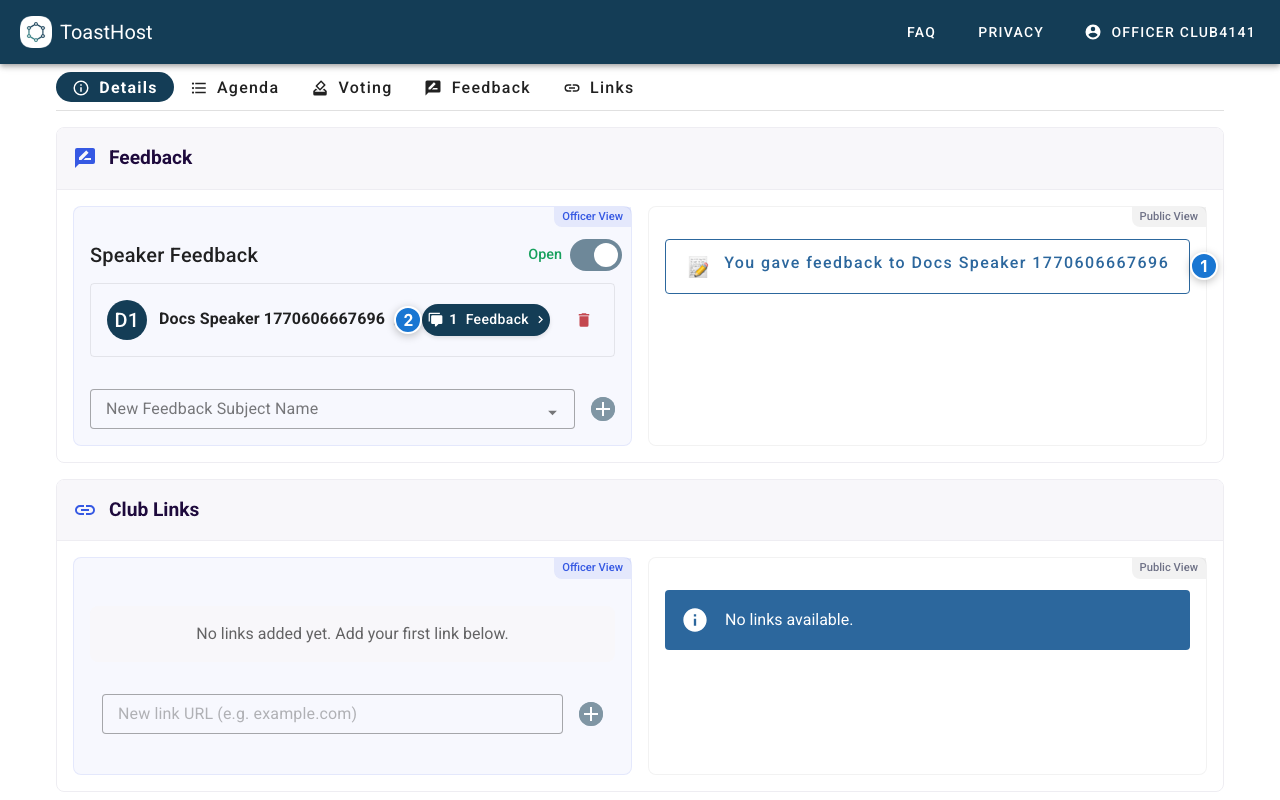
Callouts in the screenshot:
- The button now shows You gave feedback to ....
- The officer panel shows the feedback count increasing for that subject.
Copy or Export Feedback for a Speaker (Officer View)
Officers can click a speaker’s feedback count chip to open Feedback results. From there, officers can copy all feedback or export a PDF if they want to share it manually, keep an offline record, or send it outside the normal automatic email flow.
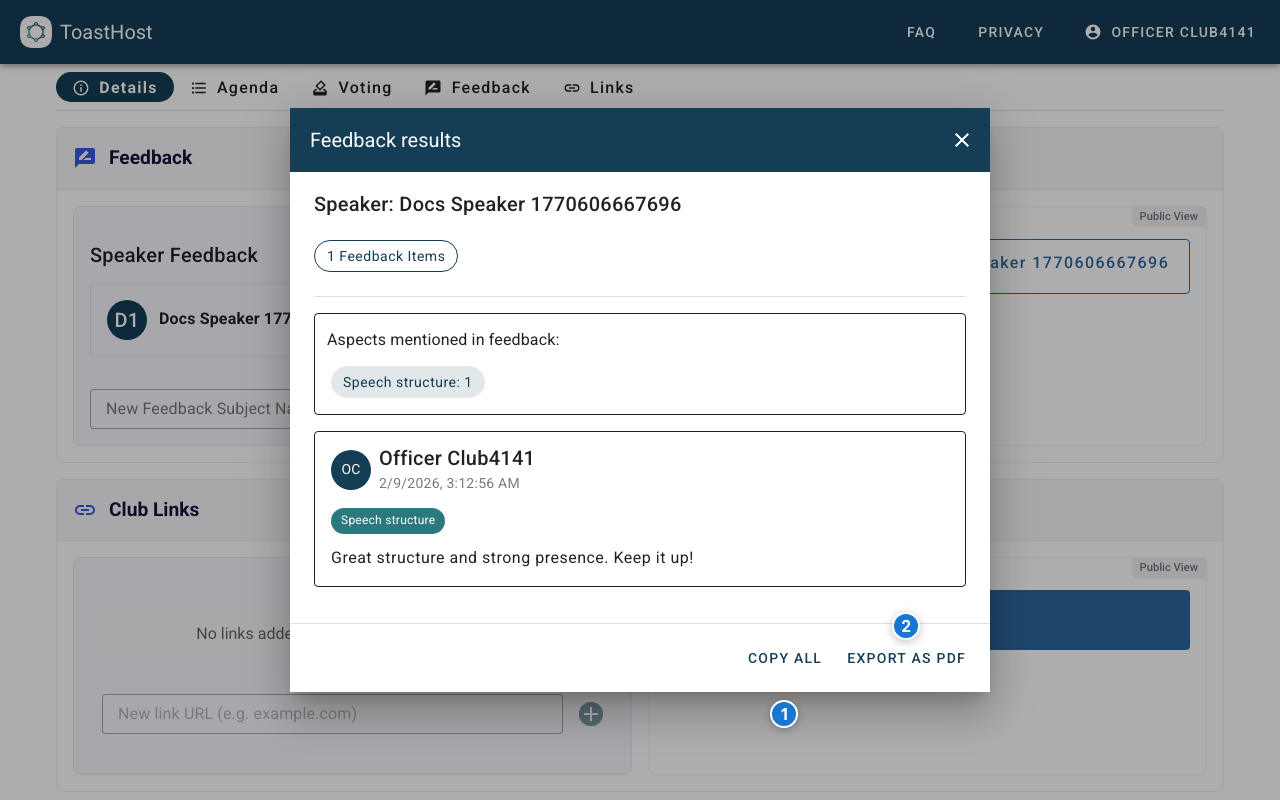
Callouts in the screenshot:
- Copy All copies every feedback item to your clipboard.
- Export as PDF generates a PDF you can share with the speaker.
After the Meeting
Finish the Meeting
- Confirm voting and feedback are closed if your club process requires it.
- Click Finish Meeting in the status banner.
- Confirm the meeting status changes to Finished.
On the first successful finish, ToastHost closes the feedback sessions and automatically emails the collected feedback to eligible speakers. Those emails use the club email address as the reply-to, and the club inbox also receives a copy so officers can verify that the feedback was sent.
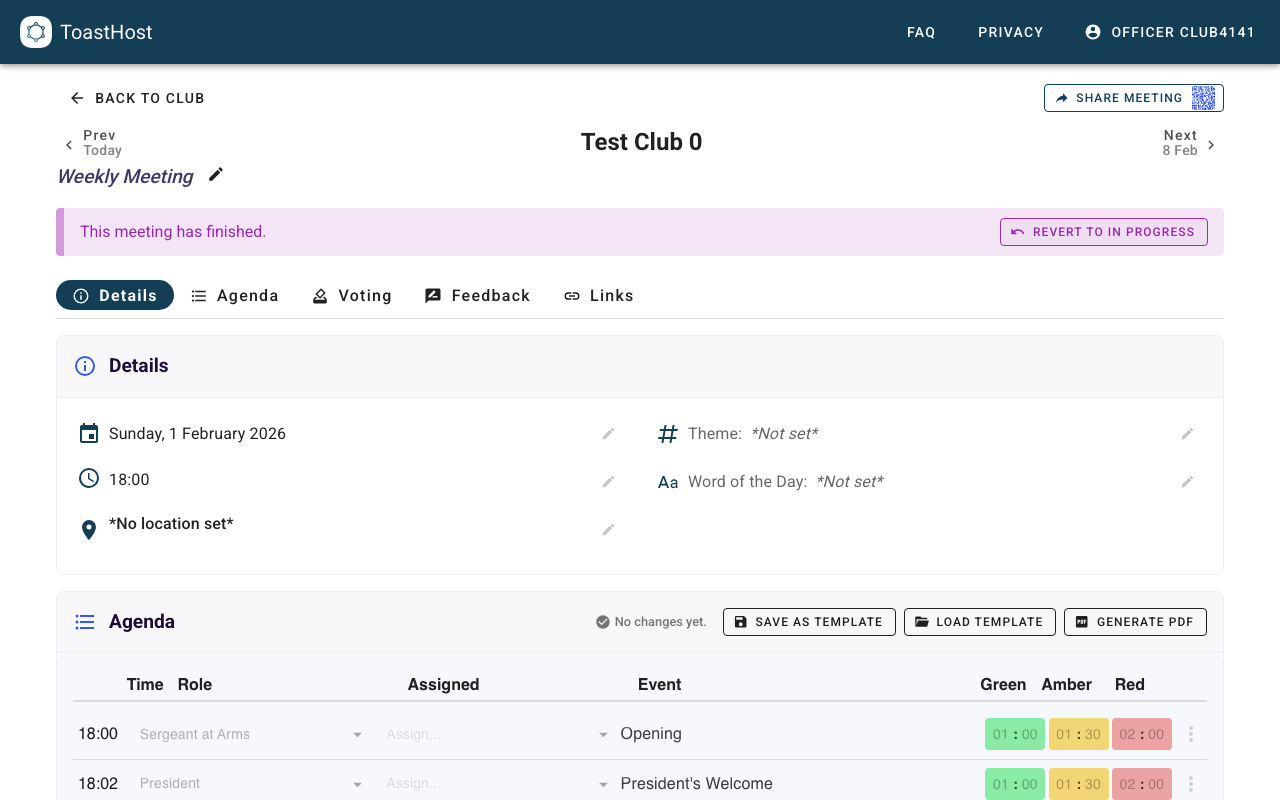
Finalize Attendance After Finish
When you finish the meeting, ToastHost runs a catch-all attendance pass for assigned agenda roles. This fills gaps for members who held roles but did not vote or submit feedback.
Review the final attendance manager state and apply any manual corrections:
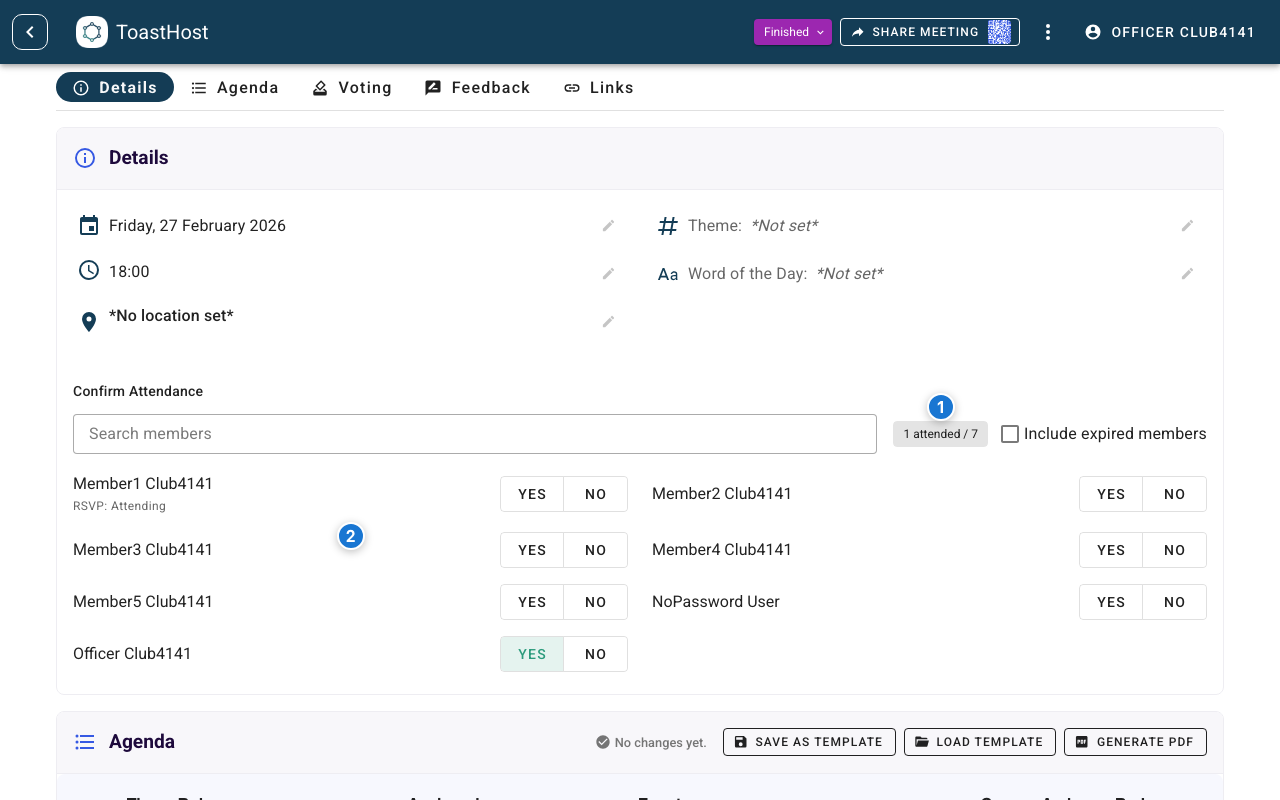
Callouts in the screenshot:
- Final summary chip after finish.
- Member attendance rows for final review and correction.
Review Outcomes
After finishing, review:
- Voting outcomes in Meeting Results
- Feedback delivery/results in Meeting Results
- Member voting flow in Voting (member view)
- Member feedback flow in Giving Feedback (member view)
Tips
- For Table Topics, add candidates as they speak instead of waiting until the end.
- Keep each category open until expected voters have submitted, then close it when the award is ready to finalize.
- Closing a category controls workflow timing; one-vote-per-user already prevents duplicate votes.
Common Questions
Why is the Add from Agenda button missing in a voting panel?
If automatic voting add is enabled, ToastHost usually adds eligible agenda participants automatically after agenda changes are saved, so the Add from Agenda button may not appear.
If automatic voting add is off, the Add from Agenda button appears only when there are eligible agenda participants for that category who are not yet candidates.
When does the Sync with Agenda button appear?
The Sync with Agenda button appears whenever ToastHost finds a review-needed difference between the current agenda and the existing agenda-linked voting candidates or feedback subjects.
In manual mode, it is used when agenda-linked entries need to be removed, or when the mismatch includes both additions and removals. For simple add-only cases in manual mode, ToastHost shows the Add from Agenda button instead. In automatic add mode, it can also appear when ToastHost needs officer confirmation to restore or finish adding agenda-linked entries. The Sync with Agenda button does not change the agenda by itself. In voting, close the category before confirming a sync that removes candidates.
How does Best Table Topics handle agenda sync?
Best Table Topics follows the same agenda sync rules as the other voting categories. If Table Topics speakers are planned on the agenda, the Add from Agenda button, Sync with Agenda button, and automatic add all work the same way.
In practice, Table Topics speakers are often decided live during the meeting, so manual candidate entry is the most common workflow. Add each speaker to the candidate list as they finish.
Can someone vote more than once in a category?
No. Each user can submit one vote per category. After voting, their button changes to You voted for ... and they cannot submit a second vote in that category.
Can officers vote?
Yes. Officers can vote from the same public voting pane shown in the meeting page.
Why didn’t the attendance count increase after someone interacted?
Auto-attendance only credits authenticated ToastHost users. Guest submissions and anonymous feedback do not create attendance rows.
What if a speaker was not assigned before the meeting?
Add them manually in the relevant voting category and feedback subjects so members can vote and submit feedback correctly.
Why is a role missing from the Best Evaluator candidate list after Add from Agenda?
The Evaluator voting roles setting in Club Settings controls which agenda roles are eligible for Best Evaluator. By default, only Evaluator and Table Topics Evaluator are included. If your club uses other roles that should count as evaluators (such as Grammarian), add them in Club Settings.
Related Topics
- Meeting Results
- Voting (member view)
- Giving Feedback (member view)
- Agenda Planning