COT Completion Tracking
Track which officers have registered and completed training across the round.
Where to track
Open the round from COT Training and select the Officers tab. It lists every officer needing training, their club and role(s), and their status.
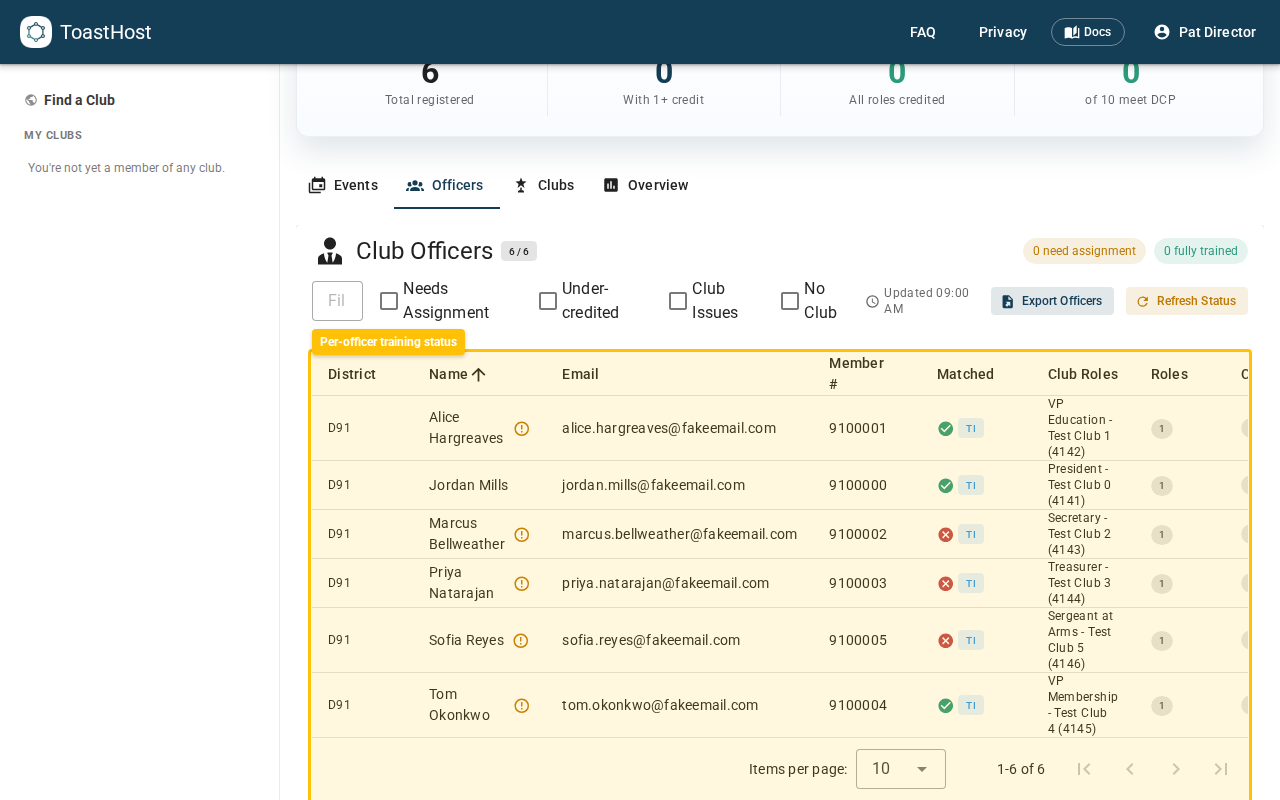
From here you can:
- See registration and completion status per officer.
- See whether each officer is Matched to a ToastHost account.
- Refresh status to recompute completion after new data.
- Export officers to CSV for district records or TI reporting.
Matching officers to accounts
ToastHost links officers to their ToastHost account by membership number or email, so an officer is still matched even when they signed up with a different email from the one in their Toastmasters record. Officers with no account show as Unmatched.
How completion is recorded
- Self-service registrations flow in as officers sign up.
- Attendance can be imported (e.g. from an online session's attendee list) or recorded manually, then matched to registered officers.
- Any attendees that don't match a known officer appear under unmatched for you to link by hand.
What counts as complete (2026 model)
An officer's role is complete once they've attended the general bookends (Part 1 + Part 2) and a Role Specific part for that role — or a single Full Session. The parts can come from different events in the round. The bookends are shared across all of an officer's roles, so each additional role only needs one more Role Specific sitting. See Training parts.
Reporting
Use the Export action for an offline record, and report completion to Toastmasters International — it counts toward each club's Distinguished Club Program (DCP) goals.
Tip
Follow up with clubs showing low completion before the round locks. A round locks one month after its end date, after which its records are read-only.