Officer Training
Club Officer Training (COT) is run by your district. Toastmasters International asks every club officer to complete training for their role each round (twice a year). ToastHost shows you the training your district has published, lets you register in a couple of clicks, and tracks what you've signed up for.
In this section
| Topic | Description |
|---|---|
| Registering for training | Find a session, register, and manage your registration |
What training involves
A COT consists of three parts:
- Part 1 and Part 2 — general training for all officers, whatever your role. These are the same for everyone and you complete them once per round.
- Role Specific — training for your particular role (President, Secretary, VP Education, and so on).
Districts typically run these as a single session (all three together) or may run them as separate sessions. To finish training for a role, attend Part 1, your Role Specific part, and Part 2 — or one Full Session. They don't have to be at the same event: take Part 1 at one of your district's events and Part 2 at another and you've still completed the bookends.
If you hold more than one role
Attend one extra Role Specific part for each additional role — you don't repeat Part 1 and Part 2.
Where to find it
Open your home page (Home in the top navigation, or /app/home). Near the top
you'll find a collapsible Officer Training panel. It stays collapsed by default
with a one-line status in the bar (for example, how many sessions you have scheduled
and when the next one is); expand it to see the training you're registered for and
the districts whose calendars you can browse.
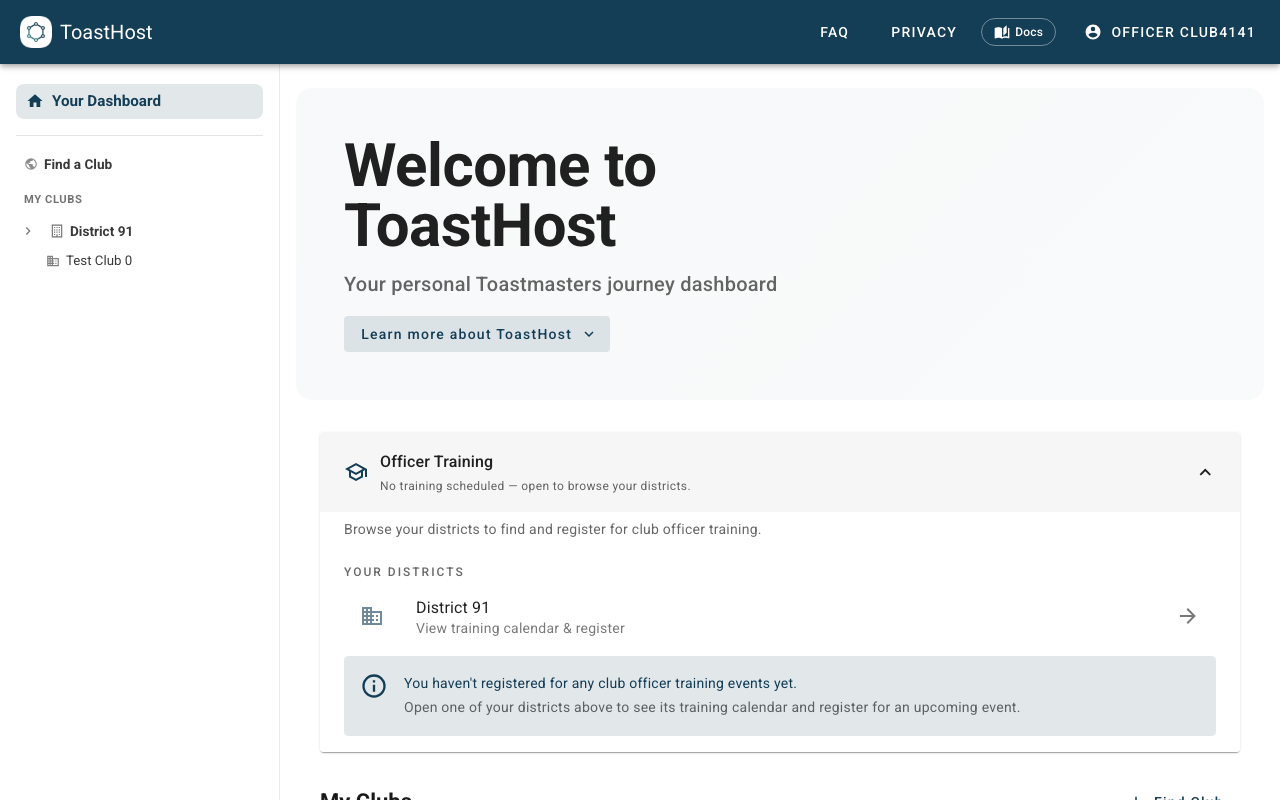
You can also reach the training calendar from your district page, which lists the district's published sessions and lets you register from there.
Note
You'll only see the Officer Training panel if you're a club officer. Training that's still a draft in your district isn't shown — only published sessions appear.
Related topics
- Registering for training
- For District Officers → COT Training (running training as a district)